Setting Up Proxies

Before we begin...

Sources

There are lots of places to get what you need to set up a proxy. Right now, I'm using OpenRouter, but Chutes is another well known option. Once my credits run out, I'm going to go directly to the source which is something I know a lot of people also do and I've heard its usually the cheaper option when paying. Where you find any of these elements might change, but the pieces themselves (API key, model name, etc.) will always be the same.

Paid models

I know that money is tight right now! I wanted to give OpenRouter's option for more free messages a try, so I added $15 USD worth of credits to my account in July. About when Gemini started cracking down on NSFW and Deepseek started to de-prioritize free models, I decided to try the paid version of Deepseek V3.1 and I've been using it since about August. Now, as of November 1st, I still have $13.56 left. Of course some models/providers are going to be more or less expensive but to give some context, I made 349 requests in all of October and spent a grand total of $0.54. Keep in mind, my RP is very token heavy.

Pros & Cons

Obviously, the biggest con of using a paid model is having to pay. However, it does have a lot of benefits. It's generally faster because you aren't competing with thousands of requests and there's far less down time. I've never had a request error since moving to a paid model. I, personally, feel like the paid version of Deepseek V3.1 is a little higher quality than the free version, but that could just be me trying to convince myself that it's worth spending money on!

There's a section at the bottom of this page with the models I've tried and the strengths and weaknesses I noticed to help you decide which one is right for you. Please remember that these are my opinions and your experience might be different, but if you're completely new at this, it might help you figure out which one you want to try first.
Find a model

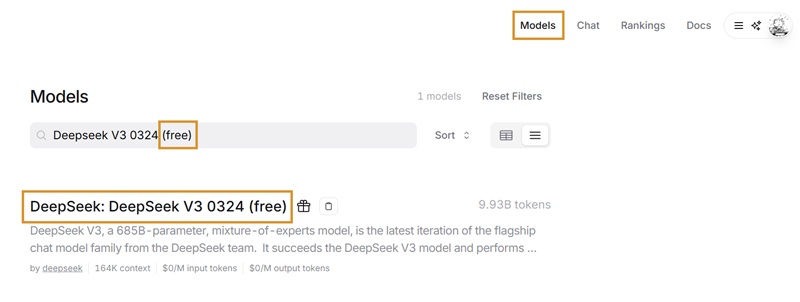
You can use the search bar in the top left, but that really only works if you know the exact name of the model already. It's much easier to browse by clicking on Models on the top right side of the page. If you're looking for free models, this search is where you can easily find them. You can also use the Prompt pricing filter on the left side, but it hasn't worked well for me with sorting for models I actually want to try.

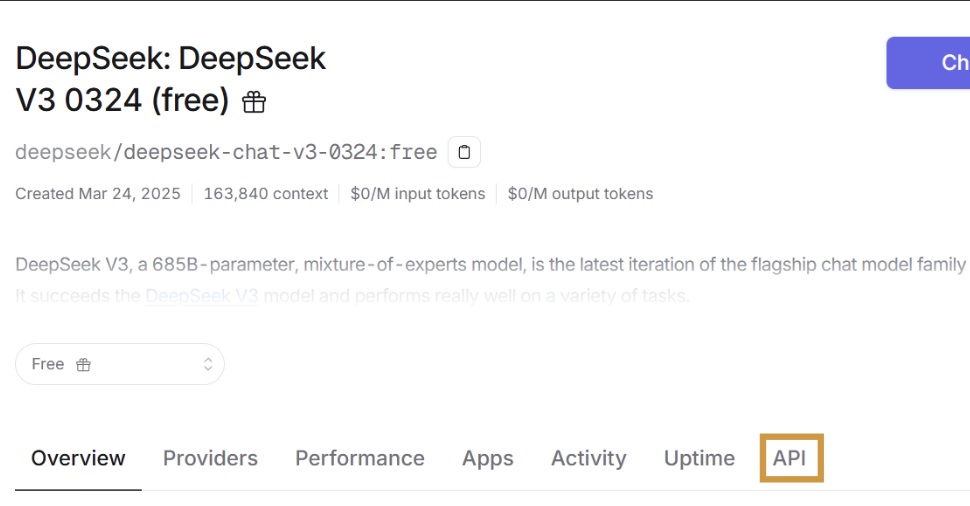
Once you find the model you want, click on the name. For the purposes of this tutorial, I'm going to set up a favorite among the Janitor community; Deepseek V3 0324 (free).

Create a new configuration on Janitor

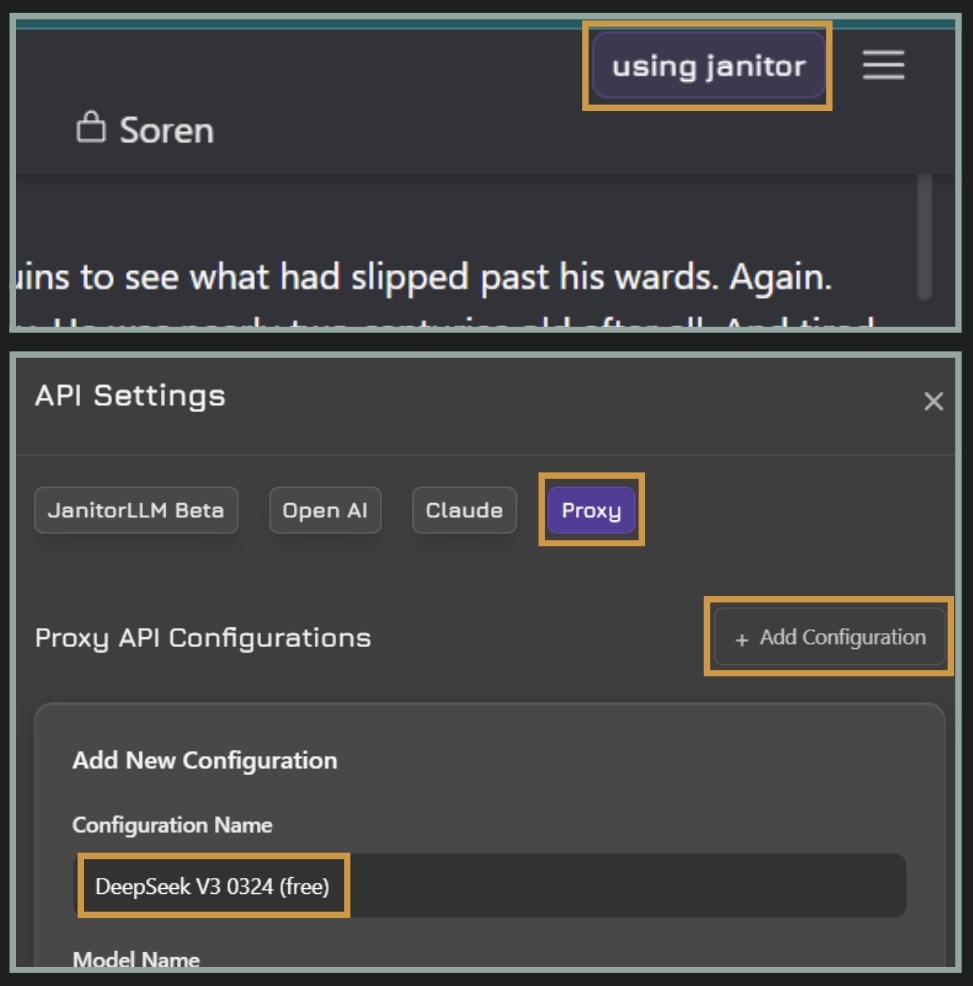
1. In any of your chats, click on using janitor in the top right corner. If you're already using a proxy and want to add another, this will say using proxy instead.

2. Click on Proxy.

3. Click on + Add Configuration.

4. Enter anything you'd like under Configuration Name. I typically use the model name to keep things organized.

Get to the API code

5. Return to your provider of choice. If you're using OpenRouter, on the page for the model you selected click on API.

Transfer other settings

6. Skip the Create API key for the moment and scroll down to the code sections.

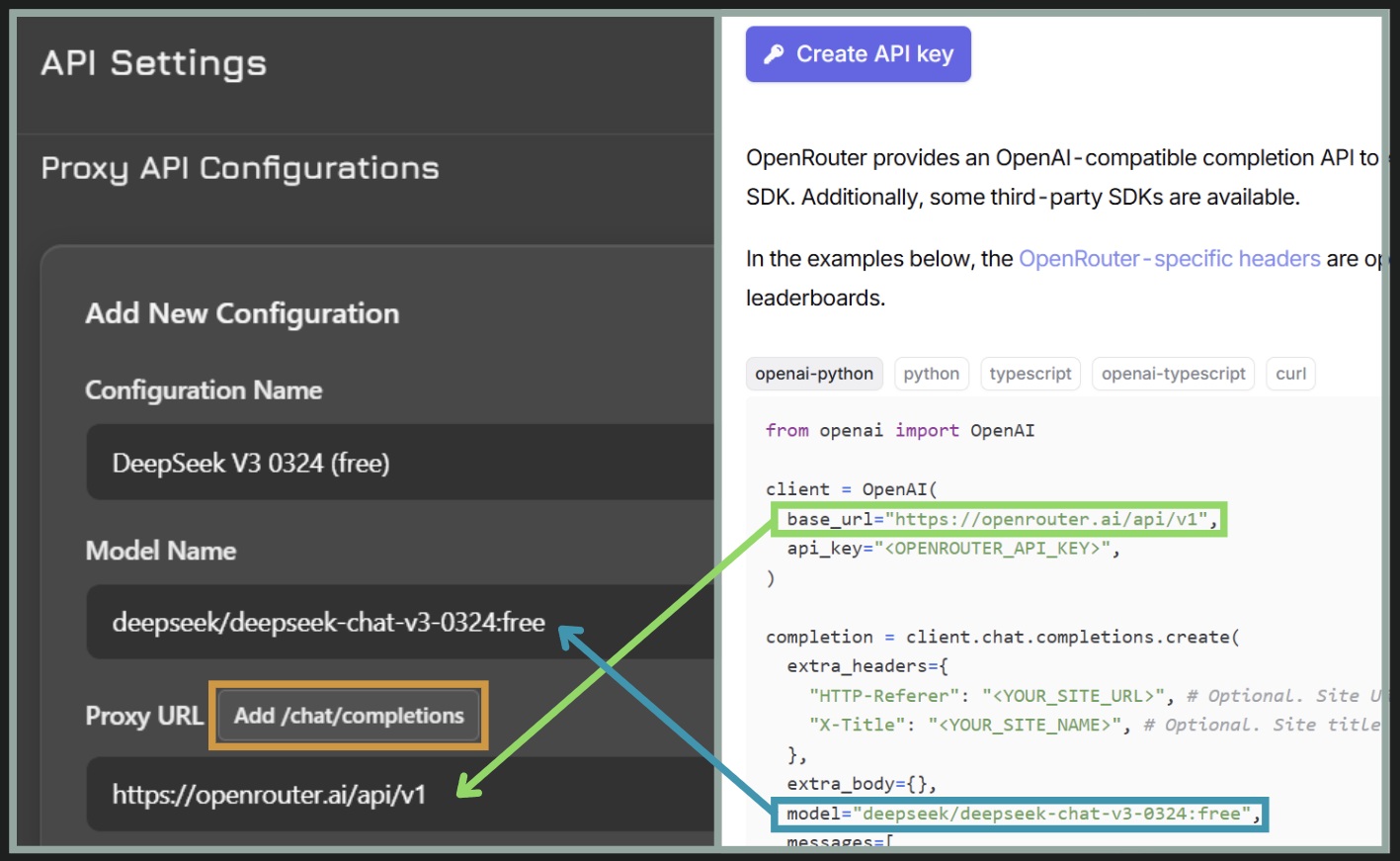
7. Copy the text between the quotes after model= and paste it into the Model Name field in Janitor.

8. Copy the text between the quotes after base_url= and paste it into the Proxy URL field in Janitor.

9. Click the Add /chat/completions next to Proxy URL

10. You can enter a custom prompt if you'd like, but it isn't necessary and you can go back to edit this whenever you'd like.

Create an API key

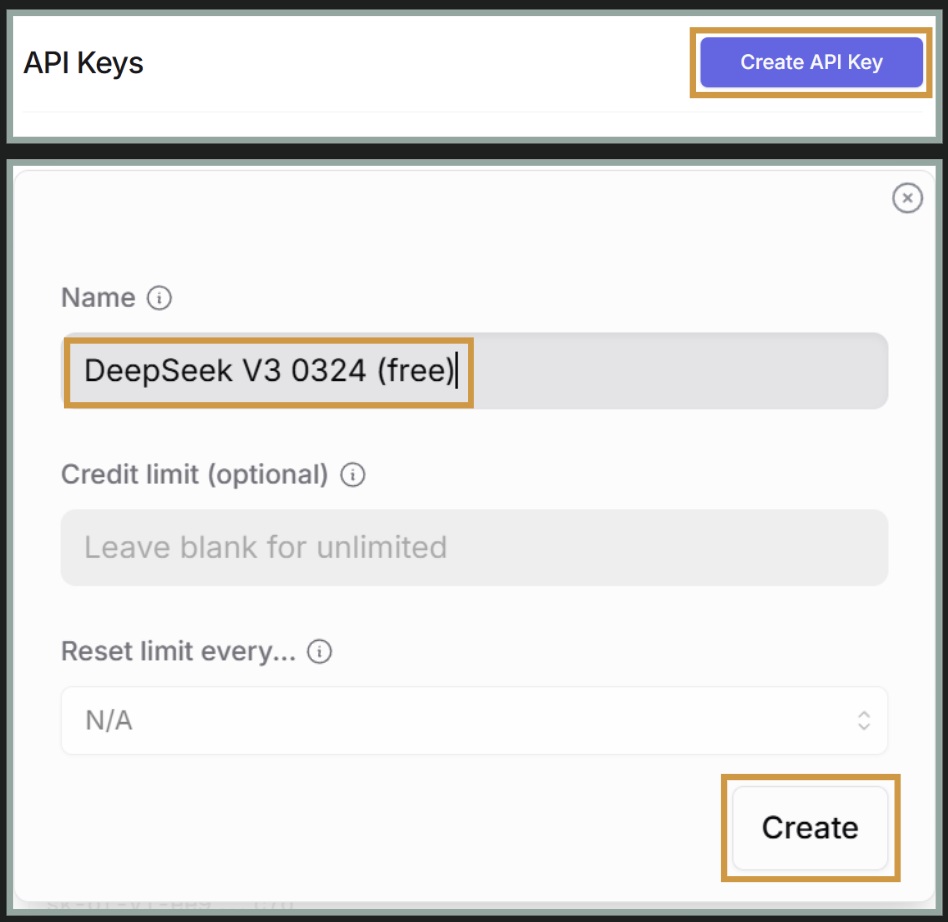
11. Now you can go back up a bit and click on Create API key.

12. On the next page, you'll have to click on Create API Key again.

13. Enter whatever name you'd like. I keep this the same as the Janitor configuration.

14. (Optional) If you you're using credits and want to set a budget, you can put a maximum amount of credits to use in the Credit Limit field.

Click Create.

Copy your API key carefully

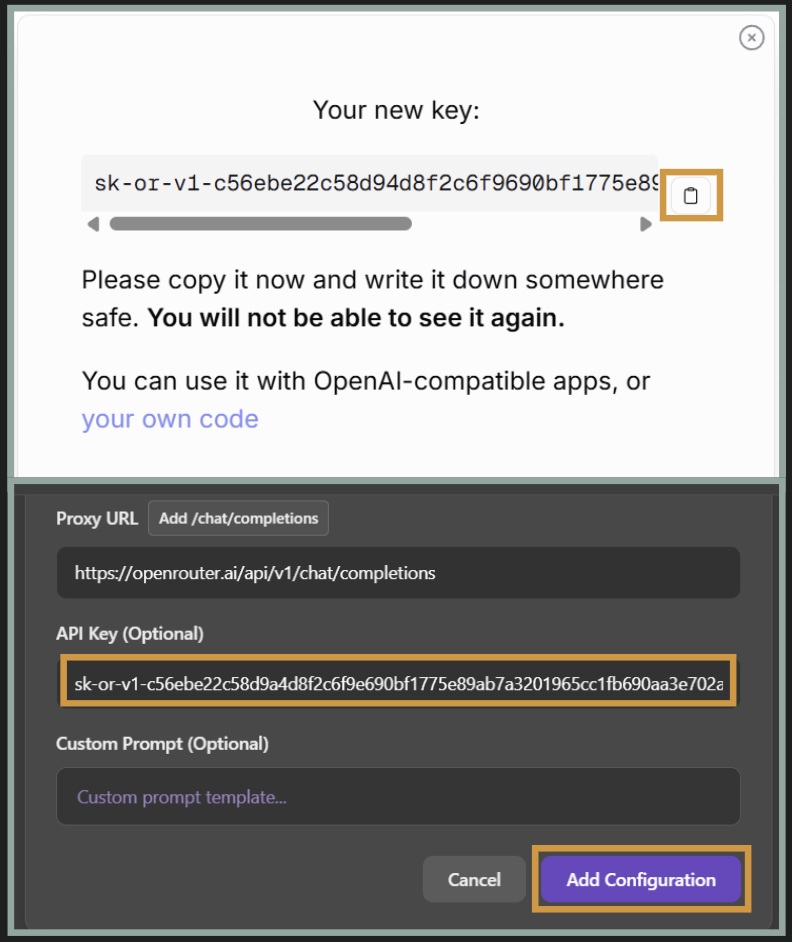
15. Click on the clipboard icon to the right of the key code.

It's important to note that once you leave this box/page, you won't be able to get to this key again. You can save it elsewhere if you'd like but I've never had one disappear in Janitor and if something does happen you can create a new one, even for the same model.

16. Paste your API key into the API Key (Optional) field in Janitor.

17. Click on Add Configuration

Go forth and chat!

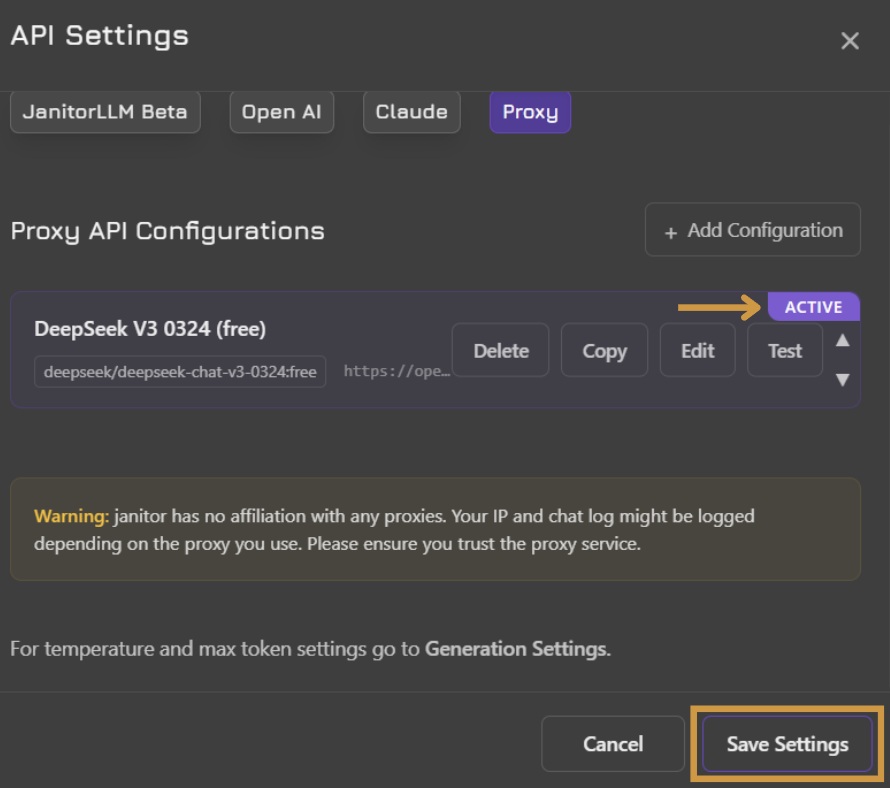
18. Confirm your new entry has the ACTIVE flag then click Save Settings.

19. Refresh your browser page.

Go have fun!